Key Architectural Insights
- The Standalone Hardware Disconnect: Rekordbox Auto-Gain calculates a software playback offset stored in the proprietary database, but standalone Pioneer CDJs (CDJ-2000NXS2, CDJ-3000, XDJ-XZ) handle this metadata inconsistently or ignore it completely depending on player preferences.
- Digital Bus Clipping: When software auto-gain boosts a heavily mastered track (+2.5 dB), the resulting digital stream exceeds 0 dBFS, triggering digital clipping in the CDJ's internal DSP mixer before audio even reaches the analog DAC.
- The Solution is Physical Normalization: Staging verified, physically adjusted audio files onto your performance USB ensures that every CDJ, Traktor controller, Denon Prime rig, or rotary analog mixer receives a bit-perfect, calibrated signal at identical perceived loudness.
Every club resident and touring DJ has lived through this scenario: you spend hours curating a crate in Rekordbox, analyzing waveforms, setting hot cues, and enabling Auto-Gain in your software preferences. But the moment you plug your USB drive into a festival Pioneer CDJ-3000 setup, track two hits 4 dB louder than track one. You find yourself frantically grabbing the channel trim pot mid-transition just to keep the master output from pushing the sound system into limiter-pumping.
Why does software auto-gain repeatedly fail on professional club rigs? To understand the problem, we must look at how digital metadata tags interact with standalone hardware firmware.
The Architecture of Software Auto-Gain
In Rekordbox Performance Mode (when your laptop is connected via HID or USB), the software acts as the master mixer. When Rekordbox analyzes a track, it calculates an approximate RMS or energy value and stores a volume offset in its internal database:
Gain Offset = Reference Target - Measured Track Energy
When you press play in laptop performance mode, the audio engine digitally scales the waveform samples in 32-bit floating-point software space before routing audio to your soundcard. This works reasonably well within the closed boundary of the laptop application.
Where Auto-Gain Breaks Down on Standalone CDJs
When you export your music library to a USB drive for standalone CDJ playback, the workflow changes fundamentally. Rekordbox writes your audio files directly to the drive alongside an export database (PDB / deviceSQL). Here is why volume consistency falls apart:
1. Hardware Player Preference Settings
CDJ players feature a hardware setting called "Auto Gain" or "Player Track Gain" in their utility menu. On many club-installed players:
- The setting is turned OFF by previous DJs who experienced clipping or prefer manual control.
- Touring USB player preference profiles fail to overwrite venue defaults on older firmware revisions.
- Certain older players (such as CDJ-900 or CDJ-2000 Nexus) do not support the identical auto-gain curve implemented in modern Rekordbox v6/v7 versions.
2. Digital Summing Headroom and Clipping
Modern commercial dance music is mastered extremely loud: often -8 to -6 LUFS with peak amplitudes already kissing 0 dBFS. When Rekordbox encounters a vintage 1990s house track mastered at -14 LUFS, its Auto-Gain algorithm calculates that the vintage track must be boosted by +3.0 to +4.0 dB.
If a track already has peaks near -0.1 dBFS and software gain applies a +3.0 dB digital boost, the resultant sample values exceed 1.0 (0 dBFS). In standalone players without 64-bit float summing, the player's internal DSP clips the signal violently, producing audible harsh digital distortion.
| Method | Hardware Compatibility | Clipping Risk | Original File Safety | Predictability |
|---|---|---|---|---|
| Rekordbox Auto-Gain | Limited (Laptop only; inconsistent on CDJ firmware) | High (Boosts push peaks over 0 dBFS) | Safe (Metadata only) | Unpredictable between clubs |
| MP3Gain / ReplayGain | Partial (Ignored by CDJ-3000 native firmware) | Moderate (Misses intersample true peaks) | In-place modification | Outdated 89 dB SPL curve |
| Physical File Normalization (Waveforge) | 100% Universal (Plays identically on CDJ, Denon, Vinyl-DVS) | Zero (True-Peak ceiling enforced at ≤ -1.0 dBTP) | 100% Immutable (Output staged to distinct files) | Absolute bit-level certainty |
Physical File Normalization: The Engineering Approach
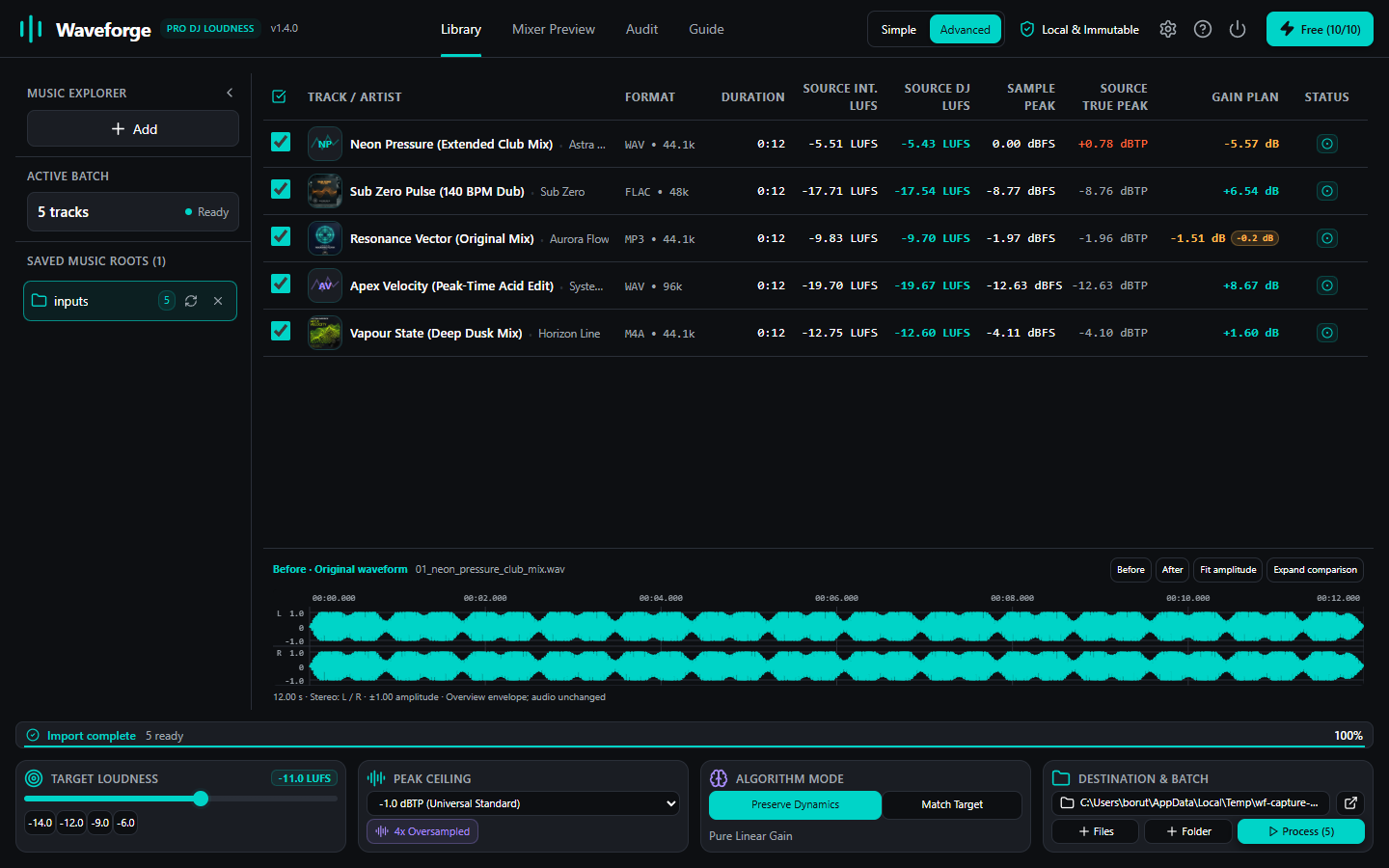
Physical file normalization means calibrating the actual PCM audio samples (or MPEG bitstream scale factors) directly on disk before importing the files into your DJ software.
Why Physical Normalization Solves the Club Problem
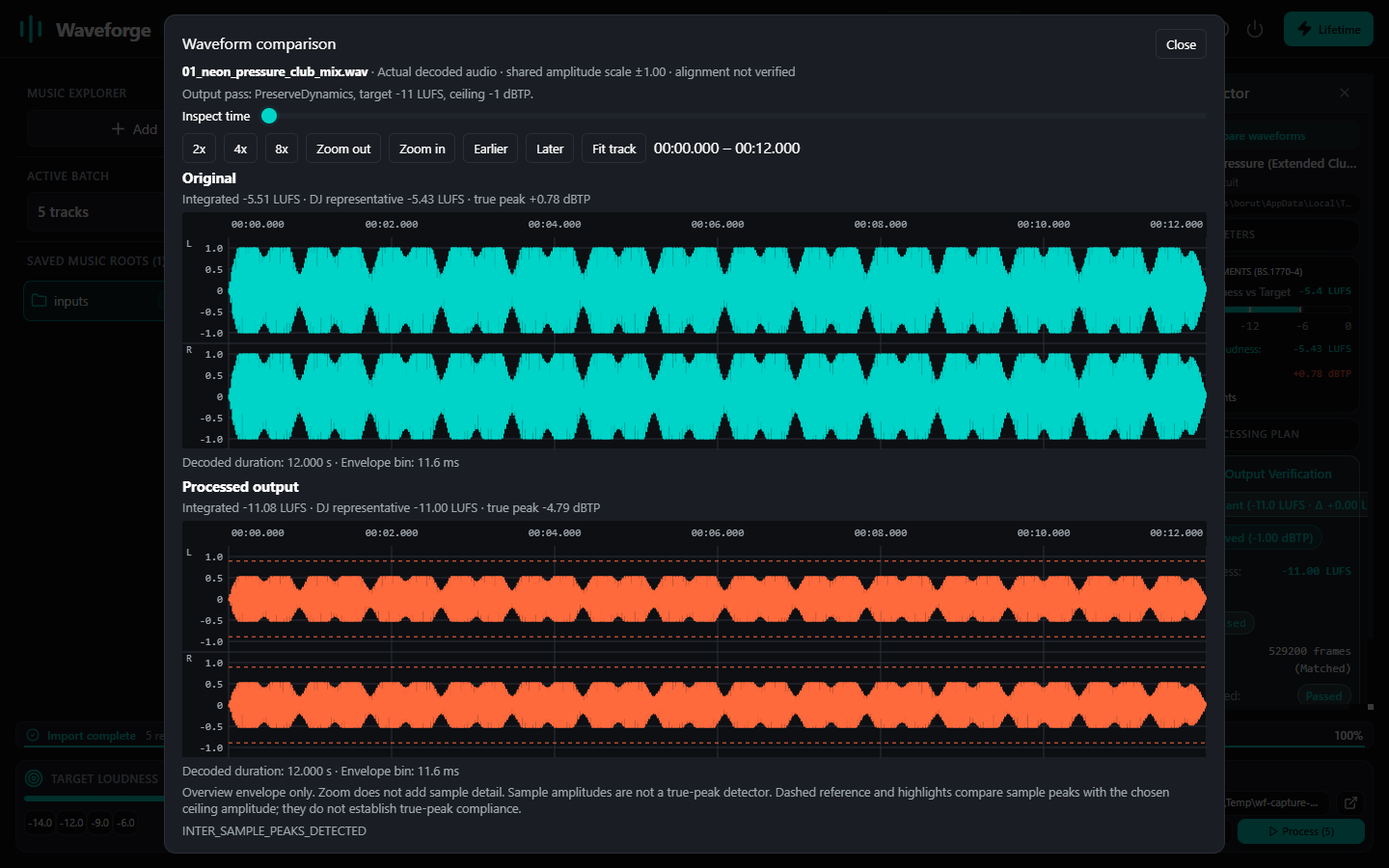
When every track on your performance USB is physically calibrated to a unified perceived loudness (such as -11.0 LUFS) with a verified true-peak ceiling (≤ -1.0 dBTP):
- The Player Doesn't Need Auto-Gain: The CDJ's digital-to-analog converter simply plays the calibrated bitstream. No metadata interpretation or firmware dependencies exist.
- Channel Trims Stay at 12 O'Clock: You can focus on track selection, phrasing, EQing, and crowd interaction rather than riding trim pots on every single blend.
- Zero Intersample Clipping: Because the files have verified true-peak headroom, the club mixer's DAC reconstruction filters never distort (see our in-depth analysis on Why Digital Masters Clip on Pioneer CDJ Mixers).
Protecting Original Files: The Waveforge Rule
Historical normalization tools had a dangerous flaw: they overwrote user source files in place. If a software bug occurred or a limiter overcompressed an original file, the master archive was ruined forever.
Waveforge enforces strict source immutability. Your master music collection is mounted in read-only mode. All normalized files are processed and staged atomically to a dedicated performance export directory (e.g., /USB/DJ_Performance_Crates/).
Recommended DJ Preparation Workflow
Here is the battle-tested workflow used by touring residents to ensure flawless performance on any stage:
- Acquire & Archive: Download new promos, Bandcamp purchases, and vinyl rips to your primary archive storage.
- Batch Process in Waveforge: Select your target crate, choose the calibrated club target (-11.0 LUFS with -1.0 dBTP true-peak ceiling), and run analysis in Preserve Dynamics mode.
- Review Headroom Shortfalls: For tracks with heavy dynamic range, Waveforge calculates the exact shortfall rather than squashing transients.
- Stage to USB Performance Folder: Waveforge writes calibrated copies to your dedicated DJ library path without modifying source files.
- Import to Rekordbox & Analyze: Import the calibrated performance folder into Rekordbox, export to your performance USB, and leave CDJ Auto-Gain turned OFF.
Ready for Predictable Club Sound?
Download Waveforge and calibrate your entire Rekordbox crate with local ITU-R BS.1770-4 analysis, true-peak protection, and zero risk to your original masters.
DOWNLOAD WAVEFORGE (v1.4.0)