Key Engineering Takeaways
- The Limiter Trap: Legacy utility tools (and some automated mastering plugins) achieve volume matching by forcing tracks through brickwall limiters or multi-band compressors. This destroys the transient crest factor of kick drums, leaving tracks sounding lifeless and flat on high-powered club sound systems.
- Pure Linear Gain Scaling: True audio normalization should apply a single static multiplication factor across all samples. This shifts perceived loudness up or down without altering the microscopic micro-dynamics, stereo imaging, or transient attack.
- The Headroom Shortfall Principle: If a highly dynamic track (e.g. vintage disco or uncompressed minimal techno) cannot reach the target LUFS without exceeding the -1.0 dBTP ceiling, it should be brought to its maximum safe linear level and flagged with an honest Headroom Shortfall indicator, rather than being squashed.
When preparing audio for DJ sets, the primary goal is perceived balance: you want every track to hit the dancefloor with consistent energy without constantly riding mixer gain trims. However, many DJs who experiment with automated volume tools notice a disturbing side-effect: the kick drums lose their physical snap, the bassline starts "pumping" unnaturally, and the open hi-hats sound crunchy and fatiguing.
This degradation happens because traditional utilities confuse gain adjustment with dynamic range compression. Let's look at the mathematical difference between linear gain and non-linear limiting, and how modern offline DSP preserves the transient life of your music.
Linear Gain vs Non-Linear Limiting: What Actually Happens to the Audio?
Every digital audio waveform is a sequence of discrete voltage samples. How a software tool modifies those samples determines whether the original master's musicality survives.
1. Linear Gain Multiplication (Transparent)
In pure linear gain scaling, every sample $x[n]$ is multiplied by a single scalar factor $k$:
y[n] = k × x[n]
Because $k$ is constant across the entire duration of the file, the relationship between quiet details and transient peaks remains 100% identical. The crest factor (the difference between the peak amplitude and the RMS/integrated energy) is perfectly preserved down to the floating-point bit level. No harmonic distortion is generated, and the compressor/expander curves designed by the original mixing and mastering engineer are untouched.
2. Brickwall Limiting and Multi-Band Dynamics (Destructive)
When software encounters a track whose peaks would exceed 0 dBFS if boosted, simple tools pass the signal into a peak limiter. Limiters operate with attack, release, and lookahead windows:
- Transient Softening: When a sharp snare or sub-kick transient arrives, the limiter detects the threshold breach and aggressively clamps the volume down within 1 to 5 milliseconds. This shaves the top off the transient spike, converting a punchy acoustic impulse into a blunt, squashed wave.
- Sub-Bass Pumping: In electronic music, 808 sub-bass notes carry immense physical energy. A limiter reacting to low-frequency peaks will attenuate the mid and high frequencies simultaneously, causing hi-hats and vocals to "duck" and pump on every beat.
- Phase Smearing: Multi-band processors split the audio into 3 to 5 frequency bands using crossover filters. In imperfect implementations, crossover filter phase shifts smear the stereo field and muddy mono sub-bass summing.
| Characteristic | Linear Gain (Waveforge Preserve Dynamics) | Aggressive Multi-Band Limiter |
|---|---|---|
| Crest Factor | 100% Preserved (Zero reduction) | Reduced by 2 to 6 dB |
| Kick Drum Transient Attack | Bit-identical micro-dynamics | Smeared / rounded attack phase |
| Harmonic Distortion (THD) | 0.000% (No new harmonics) | Introduces odd harmonic saturation |
| Club Sound System Impact | Crisp punch, physical chest kick | Muffled, fatiguing, mushy low-end |
| Mastering Integrity | Honors original mastering engineer | Overwrites artistic dynamics |
The Headroom Shortfall Dilemma: What to Do With Dynamic Tracks?
Suppose you have calibrated your DJ library to a club standard of -11.0 LUFS with a strict true-peak ceiling of ≤ -1.0 dBTP.
Now, consider an older classic track (or an organic acoustic edit) that measures -16.0 LUFS with an existing true-peak of -1.0 dBTP.
To reach -11.0 LUFS, the track requires +5.0 dB of gain. But boosting the track by +5.0 dB would push its true-peak to +4.0 dBTP, which would cause severe intersample clipping and distortion on club DACs.
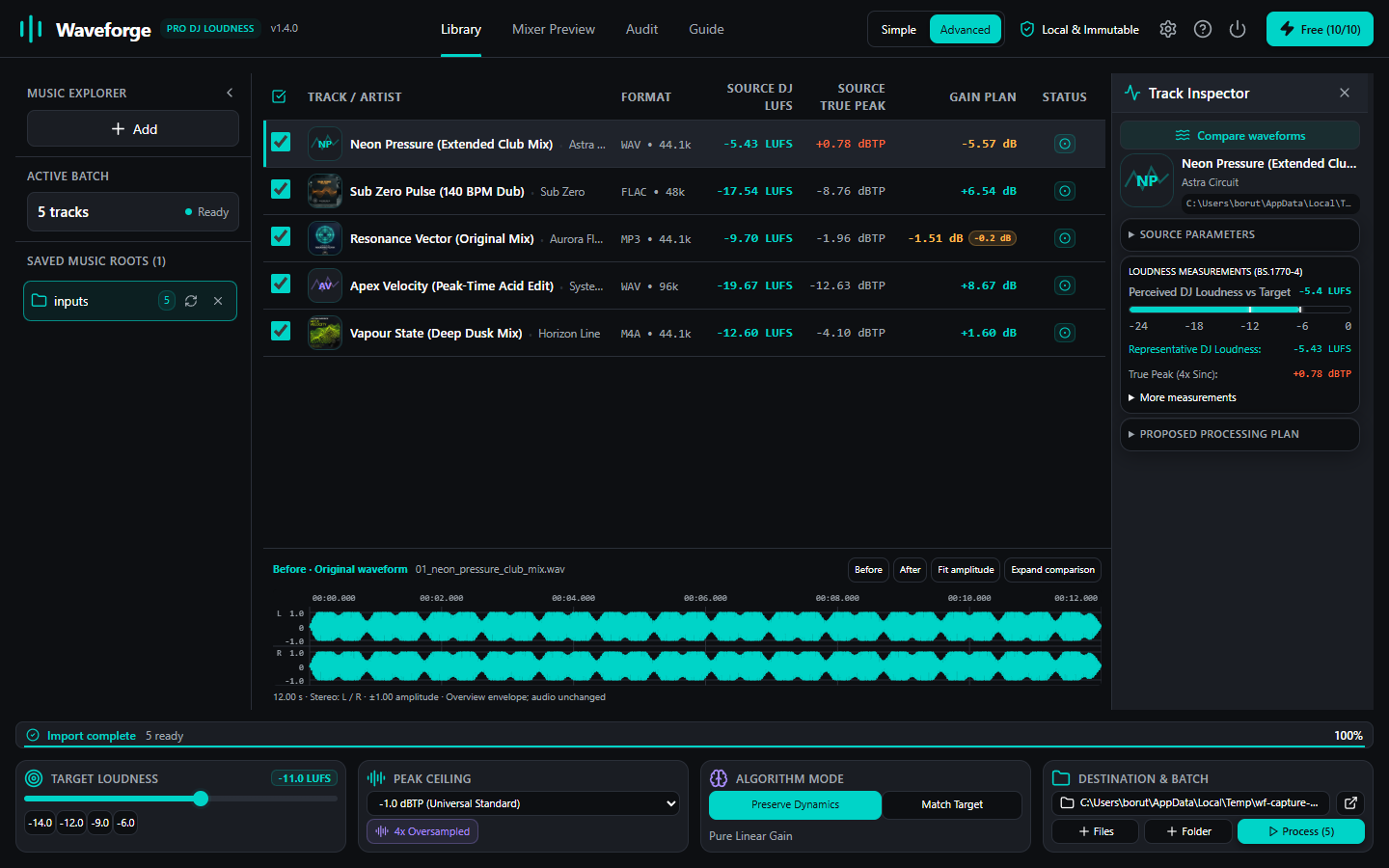
The Two Divergent Philosophies
Here is where software approaches divide:
- The Destructive Approach (Force Target): The software applies the +5.0 dB boost and slams the top 5 dB of the track into a brickwall limiter. The track now measures -11.0 LUFS on a meter, but its dynamic range is destroyed and its transient peaks are squashed.
- The Waveforge Approach (Preserve Dynamics): Waveforge applies only the maximum allowable linear gain that keeps the true-peak strictly at or below -1.0 dBTP (in this case, 0.0 dB change). It then reports an honest 5.0 dB Headroom Shortfall in the batch inspector and verification ledger.
Why Professional Sound Engineers Prefer Headroom Shortfalls
When playing on a sound system like Funktion-One, L-Acoustics, or d&b audiotechnik, dynamic tracks with preserved crest factor sound exponentially bigger, wider, and more punchy than brickwalled audio.
If a track has a 2.0 dB shortfall:
- The DJ simply nudges the mixer trim pot slightly up during that track's playback if desired.
- The audio reaching the dancefloor remains pristine, open, and dynamic.
- The amplifier racks never enter limiter protection modes.
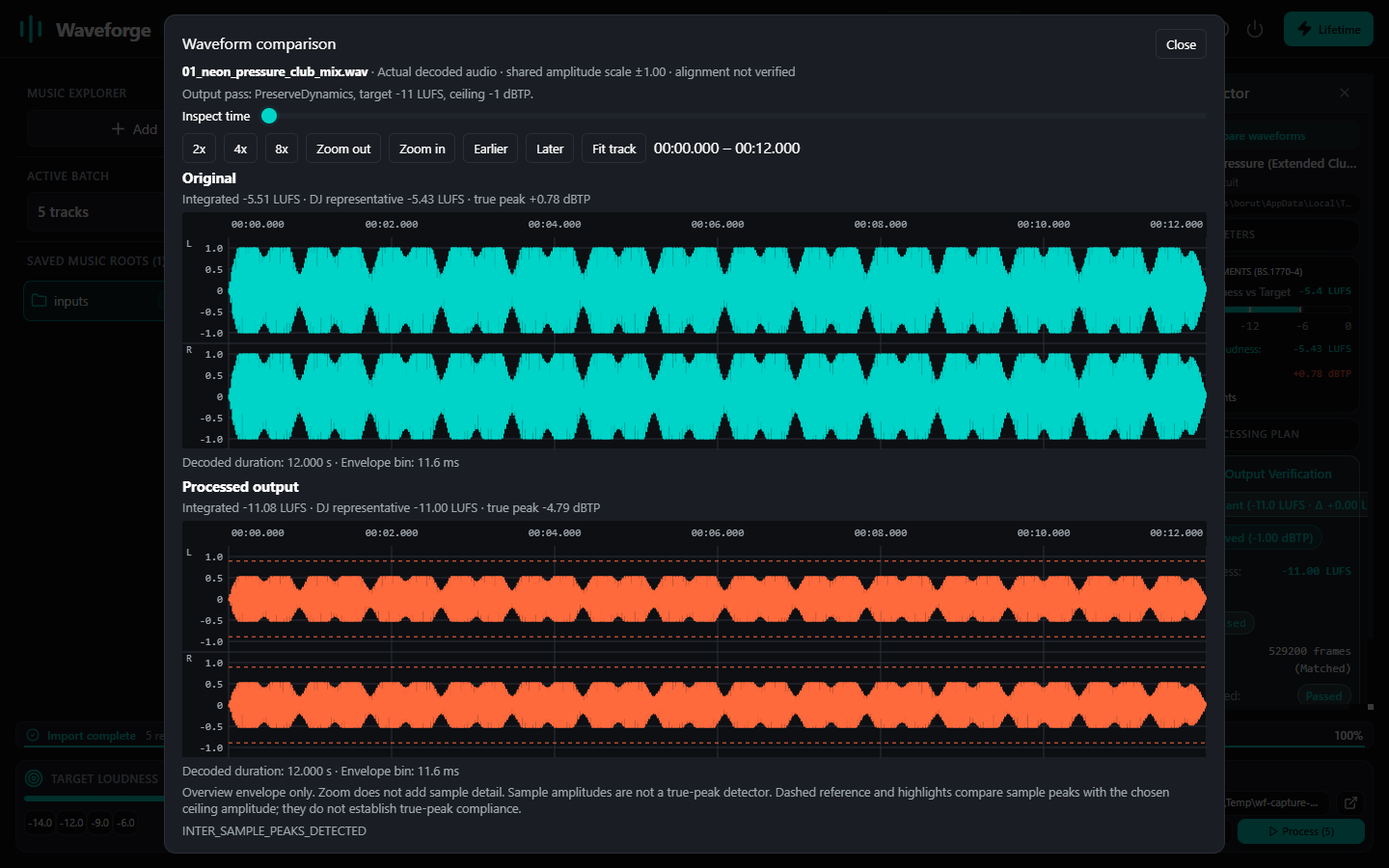
Option: When is 'Match Target' Appropriate?
Waveforge recognizes that certain DJ environments (such as high-noise mobile setups or streaming broadcasts where the DJ cannot manually touch the mixer) require absolute loudness equality.
For those workflows, Waveforge includes an optional Match Target mode with a transparent lookahead limiter. However, this is an explicit, conscious choice enabled by the user—not a silent default that ruins crates in the background.
Summary: The Golden Rules for Clean Library Normalization
- Never overwrite your original files: Always stage processed files to a dedicated performance export path.
- Default to Preserve Dynamics: Use linear gain multiplication to keep the original kick drum and bass transients bit-perfect.
- Respect the -1.0 dBTP ceiling: Protect venue DACs from intersample overshoots.
- Embrace Headroom Shortfalls: A track that breathes naturally on a 50,000-watt sound system will always move a crowd better than a flattened waveform.
Protect Your Music's Punch and Dynamics
Experience transparent, local-first DJ library calibration. Waveforge processes your music with pure linear gain, 4x oversampled true-peak protection, and zero lossy compression artifacts.
DOWNLOAD WAVEFORGE (v1.4.0)